Higgsfield AI posted something last week that the paid media world is still processing. It was a six-line workflow description. Short enough to fit in a tweet. Dense enough to describe a complete reinvention of how advertising gets made.
Here it is, verbatim:
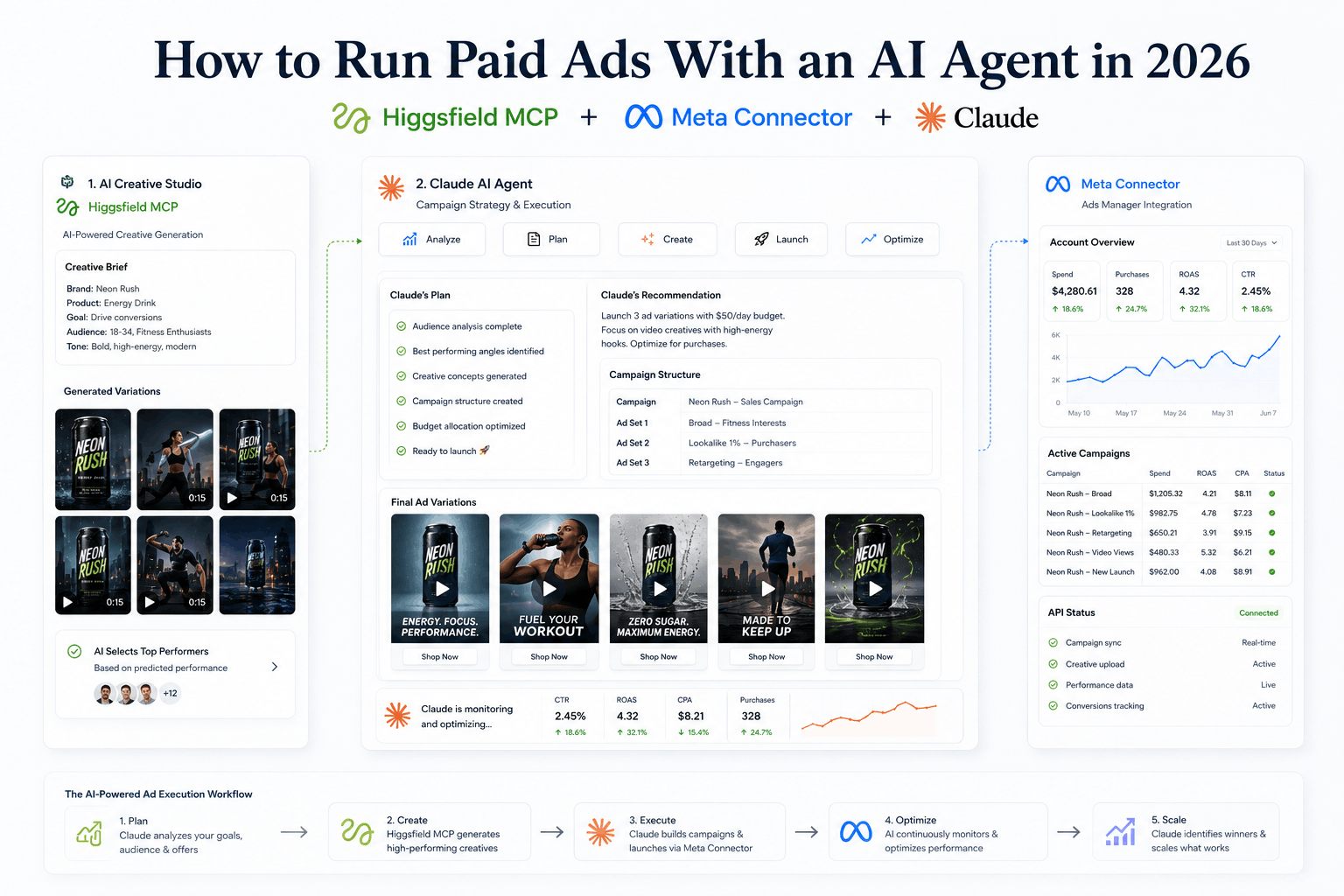
Claude Cowork researches competitor ads in Ad Library. Higgsfield MCP generates creatives. Upload visuals to Ads Manager. Meta MCP launches ads and reads performance. Winners scale via Higgsfield MCP. Runs every Monday.
Six steps. No human touching Ads Manager. No designer rendering video. No media buyer pulling reports and manually duplicating campaigns. An agent does the research, makes the creatives, launches the ads, reads the performance, and scales what's working — on a schedule, every week, while you sleep.
This is not a concept. As of the last week of April 2026, every tool in that workflow exists, is publicly available, and can be connected in under an hour. Here is the complete breakdown of what each piece is, how it works, and how to set it up.
The Stack — Three Tools That Just Became Available Simultaneously
This workflow became possible because three things launched within days of each other at the end of April 2026. The timing is not a coincidence — it reflects the broader MCP ecosystem reaching a tipping point where enough platforms have built official connectors that genuinely useful agentic workflows become possible.
Meta Ads AI Connectors — April 29, 2026
Meta announced the open beta launch of Meta Ads AI Connectors on April 29, 2026 — a set of tools that allows artificial intelligence agents from Anthropic and OpenAI to connect directly to advertisers' Meta ad accounts and perform campaign management tasks through natural language. The connectors give AI agents a secure, Meta-authenticated connection to live advertising data, providing access to real campaign performance, ad campaign creation, catalog management, and audience insights.
This is the piece that changes everything for paid media. Two years of people trying to connect AI to Meta ads — through third-party tools, through custom developer apps, through scraping — just became officially sanctioned. The long-running worry that using AI to manage Meta Ads gets your account banned is now formally retired. This is Meta's officially blessed automation path.
Higgsfield MCP — April 30, 2026
Higgsfield shipped its official MCP server on April 30, 2026, exposing 30+ image and video generation models through a single hosted endpoint. The server bundles 15+ image models including Soul 2.0, GPT Image 2, and Seedream 4.0, alongside 16+ video models including Sora 2, Veo 3.1, Kling 3.0, and Seedance 2.0, plus 9 preset video formats tuned for ecommerce: UGC, unboxing, product review, TV spot, and others.
Before this launch, generating creative through AI meant switching between multiple separate platforms — OpenAI's image tools, Google's Veo interface, Kling's subscription, Higgsfield's web app. Now one MCP endpoint gives Claude access to all of them. The agent picks the right model for the task, manages the credit cost, polls the async job, and returns the URL.
Claude Cowork — the orchestration layer
Claude Cowork is Anthropic's browser agent — a desktop tool that can browse the web, navigate interfaces, and take actions on behalf of the user. In the Higgsfield workflow, it handles the research step: browsing the Meta Ad Library to analyse competitor creatives, identifying what hooks, formats, and copy angles are working in the category, and feeding that intelligence into the creative generation step.
Together: research agent + creative generation + ad platform control. The full advertising loop in three tools, all connected to the same Claude session.
What Is MCP and Why Does It Make This Possible
If you haven't been following the Model Context Protocol story, here's the short version that matters for this workflow.
The Model Context Protocol is an open standard originally developed by Anthropic and later donated to the Linux Foundation. It functions as a standardised communication layer between AI applications and external data sources — a universal connector that allows large language models to query APIs, databases, and tools through a consistent interface.
The practical implication for advertising: instead of building a custom integration between Claude and Meta's API (which previously required creating a Meta Developer App, waiting weeks for App Review, and managing credentials manually), you add a URL to Claude's connector settings and authenticate with standard Business OAuth. Done.
Meta is not the first advertising platform to build on MCP, but it is arguably the most consequential given the scale of its advertiser base. Google's Ads API team released an open-source MCP implementation in October 2025. Amazon Ads launched its MCP server in November 2025. Google Analytics released its MCP server in July 2025.
The ecosystem is assembling. Meta's arrival with full write access — not just read — is the moment it becomes useful for actual ad operations rather than just reporting.
Step 1: Set Up Meta's Official AI Connector
Meta launched two artifacts under the "Meta Ads AI connectors" umbrella: a Meta Ads MCP server — a hosted HTTP endpoint — designed for desktop and chat-style clients that wire MCP servers into a config file; and a Meta CLI — a terminal binary — for developers running Claude Code in the terminal. Both connectors talk to the same underlying Marketing API surface, with full read and write access. You can query campaign performance, edit budgets, pause underperformers, manage product catalogs, and run signal diagnostics on Pixel and CAPI.
For Claude Desktop (the MCP route — recommended for most marketers):
- Open Claude Desktop and go to Settings → Connectors
- Click Add Custom Connector
- Name it "Meta Ads" — the name doesn't affect functionality
- Paste the MCP server URL provided by Meta:
https://mcp.meta.com/ads/<your-business-id> - Click Connect — Meta's standard Business OAuth screen will appear
- Select which ad accounts Claude can access — only expose the accounts you need, especially in agency environments
- Set permission levels for each tool — you can choose "Always Allow," "Ask Permission," or "Block" for each action type
Setup is five to seven minutes for the MCP versus the old process of twenty-five-plus minutes including a multi-day Developer App review process.
For Claude Code (the CLI route — for developers and automation builders):
The CLI exposes commands like meta campaigns list, meta insights run, and meta budgets set that Claude can call as shell commands. No JSON config, no restart cycle.
Test it works:
Open a new Claude conversation and type:
"Show me my top 5 campaigns by spend in the last 7 days with ROAS for each."
If Meta is connected correctly, Claude will pull live data from your account and present it in a readable format. That's it. The connection is live.
Step 2: Set Up Higgsfield MCP
The Higgsfield MCP setup is shorter than any other MCP because there is no API key, no OAuth scope to negotiate, no .env file to maintain.
- In Claude Desktop, go to Settings → Connectors
- Click Add Custom Connector
- Name:
Higgsfield - URL:
https://mcp.higgsfield.ai/mcp - Click Connect — you'll be redirected to Higgsfield's auth
- Sign in with your existing Higgsfield account
- Approve the connector — your existing plan credits transfer automatically
Verify it works:
"List my available Higgsfield models and show my current credit balance."
You should see the full model roster and your credit count.
A note for users running multiple MCP servers: 30+ tool definitions cost context. Higgsfield plus Meta plus any other connector can chew through 12K tokens before you type your first prompt. Pair Higgsfield with MCP Tool Search so model schemas load on demand — with it, the cost drops to a few hundred tokens until a tool is actually called.
Step 3: Understanding the Model Roster
The reason Higgsfield MCP is the right creative layer for this workflow — rather than any single image or video tool — is the breadth of what it exposes. Different ad formats require different generators, and the MCP lets Claude pick the right one automatically.
A practical guide to which models to use for which ad surface:
For hero product images (Facebook/Instagram feed, single image ads): Soul 2.0 — Higgsfield's photorealism engine. Best for product-on-background shots, lifestyle imagery, and anything where the output needs to look like a professional studio photograph. Use when you need the creative to pass as real.
For product images with text overlay: Nano Banana Pro — specifically strong at text-on-product rendering, which is notoriously difficult for most image generators. Use for ad creatives with pricing callouts, feature labels, or promotional copy burned into the image.
For short-form video (TikTok, Instagram Reels, Facebook Reels): Kling 3.0 or Seedance 2.0 — best for dynamic product movement, smooth transitions, and the kind of social-native motion that performs on short-form placements. Kling 3.0 is currently the community consensus for ecommerce video.
For cinematic/TV-quality ad video: Sora 2 or Veo 3.1 — higher quality, higher credit cost, longer generation time (3–5 minutes for 4K). Use for awareness campaigns, brand-level creative, or when testing a premium creative against a cheaper variant.
For UGC-style creative: The 9 preset ecommerce formats in the MCP include UGC, unboxing, and product review templates specifically tuned for performance creative. These are the fastest path from brief to deliverable for direct response campaigns.
Step 4: The Full Workflow — Exactly How It Runs
Here is the complete automated loop that Higgsfield described, broken down step by step with the actual prompts and what Claude does at each stage.
Every Monday, the agent runs this sequence:
Stage 1 — Competitor Research (Claude Cowork / Browser Agent)
Claude Cowork navigates the Ad Library, reads the creative content, identifies patterns, and produces a competitive intelligence brief — in minutes rather than the hour a human analyst would spend on the same task.
Stage 2 — Creative Generation (Higgsfield MCP)
Claude sends generation jobs to Higgsfield MCP, polls the async video jobs (typically 3–5 minutes for video, seconds for images), and returns a complete set of creative assets with matched copy — ready to upload to Ads Manager.
Stage 3 — Campaign Launch (Meta MCP)
Claude uses the Meta MCP to create the ads programmatically — no manual upload, no clicking through Ads Manager. The full batch of creative variants launches as a test with a modest daily budget.
Stage 4 — Performance Reading (Meta MCP)
The following Monday (or after a set run period — typically 5–7 days for meaningful data):
Stage 5 — Scale Winners (Meta MCP + Higgsfield MCP)
This is the loop. Research, generate, launch, read, scale. Every Monday. Automated.
The Safety Layer — What Not to Let the Agent Do Unsupervised
This section is important. The workflow above is powerful, and it is tempting to set it to fully autonomous. There are specific actions where human review before execution is worth the few minutes it adds.
Review before applying. Run any read operations first to confirm the data looks right before executing writes. Never let the agent auto-apply pause or budget actions without a human approving the diff.
Be gradual. Don't scale a budget more than 20% in a single move. Meta's systems flag abrupt spend spikes as suspicious behaviour, separately from content review. One account at a time — if automating multiple accounts, run them sequentially with 15+ minute delays, not in parallel. Parallel burst API calls are the most-cited trigger for account restrictions in the community.
The practical setup: use the "Ask Permission" setting for budget modification and campaign creation tools in Meta MCP settings, and "Always Allow" for read operations (performance data, campaign lists, audience insights). This means Claude will surface the proposed changes for your approval before executing them — adding a 30-second review step that protects against the edge cases where the agent misunderstood the brief.
Never automate the Ads Manager UI through browser control. The Meta MCP uses the official Marketing API — that is the only path Meta considers legitimate for programmatic ad management.
What This Means for UAE Businesses and Agencies
The immediate practical implications depend on your context.
For businesses running their own ads: This workflow eliminates the most time-consuming parts of performance marketing — the weekly creative refresh, the manual reporting pull, the budget adjustment based on performance data. A business owner who currently spends 3–4 hours per week on ad management can reduce that to a 30-minute Monday morning review of what the agent did and approval of the proposed changes.
For agencies managing multiple clients: A 3-person agency scaled from 8 to 20 client accounts without hiring, using AI-assisted campaign audits and optimisation workflows. The creative generation bottleneck — the part where you need a designer to produce new ad variations — is removed entirely. The performance analysis that used to require an analyst pulling data across accounts happens in seconds. The operational leverage is significant.
For the UAE market specifically: WhatsApp Business integration sits within Meta's ecosystem, and the Marketing API that underpins these connectors gives access to the same data infrastructure that drives WhatsApp and Instagram advertising. As Meta expands what the MCP can access, the integration between Ads Manager performance data and WhatsApp campaign data will become increasingly seamless.
Setting Up the Full Stack — Quick Reference
Total setup time: under 30 minutes from zero to a connected, working pipeline.
The Bigger Picture
What Higgsfield described in six lines is not just a useful workflow. It is a preview of what performance marketing becomes when the research, creative production, and campaign management layers are all accessible to the same agent.
The creative bottleneck was always the rate-limiting step in paid advertising. You could have the strategy, the audience, the budget — and then wait a week for the designer to deliver the assets. The Higgsfield MCP removes that bottleneck. You can generate 12 creative variants in the time it takes to write the brief, test them all against real audience data, and scale the winners — all within the same Claude session.
The AI connectors sit within a longer pattern of Meta expanding automation across its advertising stack. What distinguishes Meta's implementation is the write access it offers from day one — not just analytics, but actual campaign creation, budget management, and audience control.
The combination of Higgsfield's creative generation and Meta's official campaign management API — connected through Claude via MCP — is the first version of what fully agentic paid advertising looks like. It runs every Monday. And it gets smarter every time.
Tools referenced in this guide:
- Higgsfield MCP:
https://mcp.higgsfield.ai/mcp— 30+ image and video generation models - Meta Ads AI Connectors: Official MCP at
https://mcp.meta.com/ads/<business-id>— launched April 29, 2026 - Meta CLI:
npm install -g @meta/ads-cli— terminal-based Meta Marketing API access - Claude Cowork: Anthropic's browser agent for competitive research
- Pipeboard: Third-party MCP supporting Meta, Google, TikTok, and Snap Ads via a single connector
Want an AI-powered advertising pipeline built for your business?
At Joyboy, we design and build agentic automation workflows for UAE businesses — including creative generation, campaign management, and AI-driven ad operations. Talk to us about what you want to automate.