

Iqbal
Co-Founder, Chief Technology Officer

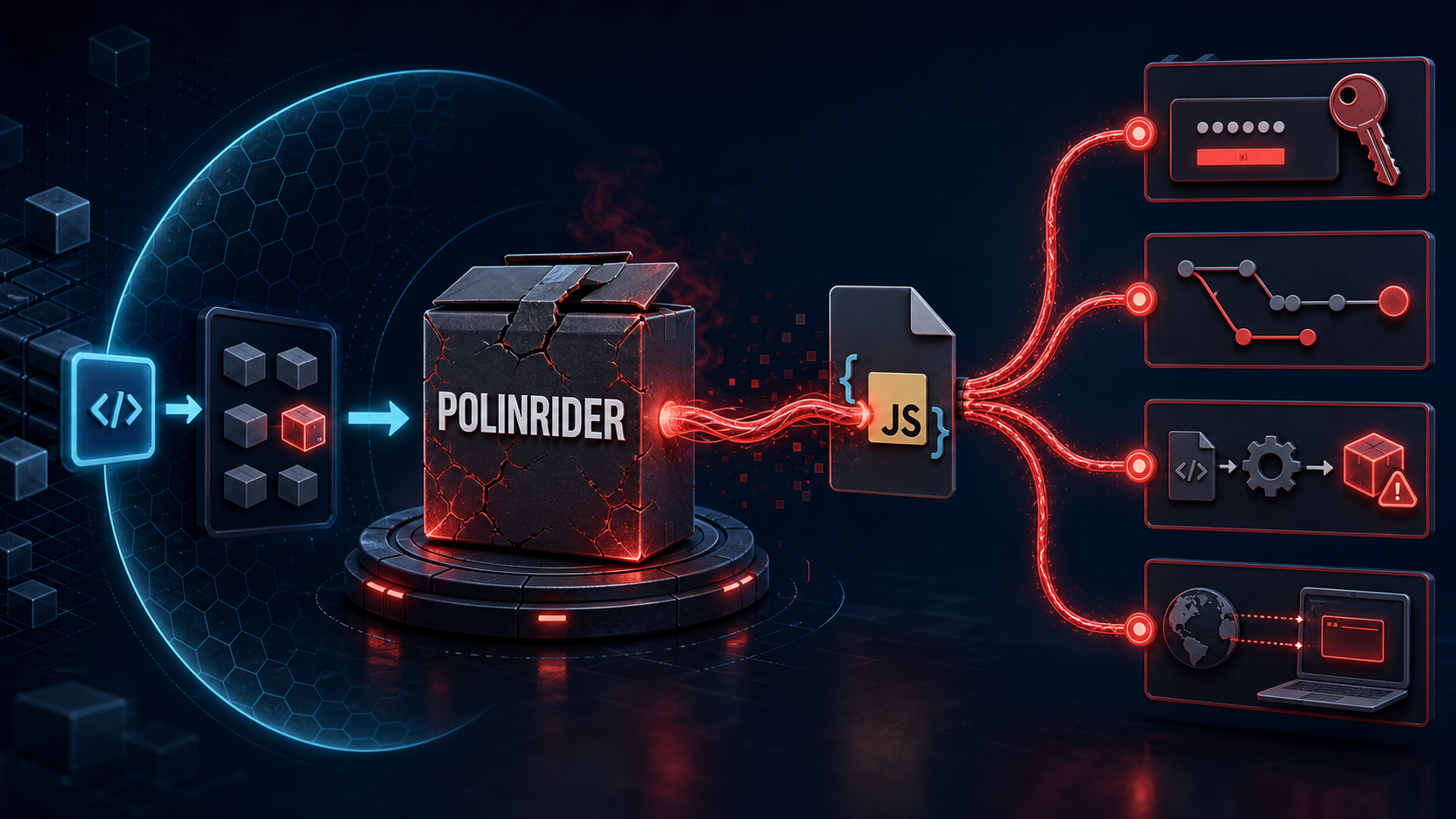
The PolinRider attack is an npm supply-chain threat that uses malicious packages and hidden JavaScript loaders to deliver remote-access malware. This guide explains how PolinRider works, how to detect it in npm projects and Git history, how to remove it safely, which credentials to rotate, and which controls can prevent reinfection.
The short version
- Treat unusually large or obfuscated configuration files as executable security events.
- Do not rely on
npm auditalone; repository-injected code may not appear in the dependency graph. - Search all local and remote branches, tags, reflogs, and Git objects.
- Assume secrets available to the affected process may have been exposed and rotate them.
- Rebuild affected machines and runners from a known-good state instead of trusting a source-only cleanup.
- Protect high-risk files and package changes with review, automated policy, and runtime monitoring.
What is PolinRider?
Security researchers use the name PolinRider for a campaign in which attackers publish or hijack npm packages and use JavaScript loaders to retrieve later-stage malware. Public analysis from Socket describes a broad malicious-package operation, while Sonatype documents a hijacked package attempting to deliver a PolinRider-linked remote-access trojan.
The dangerous part is not limited to a package name. Once malicious code reaches a workstation or repository, it can be placed in a file developers already expect tools to execute: ESLint, PostCSS, Vite, test-runner, or build configuration. That changes the investigation from “Which dependency is vulnerable?” to “Which code executed, where did it persist, and what could it access?”
How does the PolinRider attack work?
The samples we investigated used ordinary .mjs configuration files as cover. A small legitimate configuration appeared at the top. Farther along—after enough whitespace to evade a casual review—an obfuscated loader performed network discovery, decoded an encrypted payload, evaluated it, and launched a detached Node.js process.
This pattern creates several warning signs:
- A configuration file grows from a few hundred bytes to tens of kilobytes without a clear reason.
- One line is extraordinarily long, or meaningful code appears after a large whitespace gap.
- A linting or CSS configuration unexpectedly imports
child_process, networking modules, or dynamic module loaders. - The file uses
eval,Function, XOR loops, encoded byte arrays, or detached process spawning. - The code contacts unrelated APIs, public RPC endpoints, paste services, or unfamiliar domains.
.gitignoreprotection for.envfiles is weakened in the same period.
Each signal can have an innocent explanation. Several together demand immediate containment.
How to detect PolinRider in a JavaScript project
Begin with read-only checks. Do not run the project, install dependencies, or execute unfamiliar configuration files until the initial review is complete.
Check whether executable configuration files are unexpectedly large:
Search source files for behaviors that rarely belong in linting, CSS, or build configuration:
Review the full history of high-risk files instead of inspecting only their current contents:
Finally, list every branch and tag, compare remote references, and inspect old clones or CI caches. A clean working tree proves only that the checked-out files are clean; it does not prove that the repository or machine is safe.
PolinRider attack case study: what we found
During our review, we found loaders embedded directly in two JavaScript configuration files across two repositories. One was hidden in a PostCSS configuration; another was hidden in an ESLint configuration. Multiple branches and release tags still referenced the malicious objects even after the visible working copy had been corrected.
We also found more than one loader generation in history. That matters because cleaning only the newest sample would leave an older variant reachable. The dependency manifests and lockfiles did not contain the known PolinRider package names we checked, reinforcing an important point: this was not something a standard package vulnerability report could fully describe.
Can npm audit detect PolinRider?
npm audit compares the resolved dependency tree with known vulnerability advisories. It is useful, but it answers a narrower question than an incident responder needs.
| Security check | What it can find | What it may miss |
| ------------------------------- | -------------------------------------------------------- | ------------------------------------------------------- |
| npm audit | Known vulnerabilities in resolved packages | Malicious code committed directly to the repository |
| Lockfile review | New or changed dependencies and sources | Payloads hidden in first-party configuration files |
| Malware-aware package scanning | Known malicious packages and suspicious install behavior | Historical Git objects and already-compromised machines |
| Source and history scanning | Obfuscation, loaders, and persistence across references | Secrets already copied or commands already executed |
| Endpoint and network monitoring | Process and outbound-connection behavior | Dormant code that has not run yet |
A sound assessment combines all five perspectives.
How to remove PolinRider safely
1. Contain before editing. We paused execution of the affected projects and treated developer and automation environments as potentially exposed. Preserving a copy of the evidence before cleanup is important for understanding scope and supporting later investigation.
2. Establish a trusted baseline. We compared file history, sizes, hashes, and commits to identify the last legitimate version. We searched the entire object database rather than trusting only the current checkout.
3. Restore active files. We replaced the injected configuration with the minimal legitimate configuration and restored protections that prevent local environment files from entering Git.
4. Inspect every reference. We checked local branches, remote-tracking branches, tags, reflogs, and unreachable objects for both known loader variants and behavioral indicators. This revealed affected release tags that a main-branch-only scan would have missed.
5. Rewrite affected history. We rebuilt each affected branch and tag from its trusted parent, preserving legitimate later work while excluding the injected changes. We then expired obsolete references and pruned the malicious blobs locally.
6. Update the remote safely. Because rewritten commits have new identities, affected references required coordinated force updates. We used lease-protected pushes and verified the resulting remote references instead of using an unconstrained force push.
7. Rotate credentials. Source cleanup cannot undo credential theft. We revoked and replaced secrets available to affected developer sessions or runners, including source-control tokens, cloud credentials, deployment keys, npm tokens, application secrets, and relevant SSH keys. We also reviewed authentication and audit logs for unexpected activity.
8. Rebuild execution environments. A detached payload can outlive the file that launched it. We rebuilt affected workstations and CI runners from trusted images, cleared caches, reinstalled dependencies from a reviewed lockfile, and rescanned the clean result.
Deleting a file versus completing remediation
| Action | Current branch | Other branches and tags | Credentials and hosts | Suitable response | | ------------------------------------- | -------------: | -----------------------: | --------------------: | ----------------- | | Delete the suspicious lines | Clean | Still exposed | Unaddressed | No | | Revert the bad commit | Clean | May remain exposed | Unaddressed | No | | Rewrite all affected Git references | Clean | Clean after verification | Unaddressed | Incomplete | | Rewrite, rotate, rebuild, and monitor | Clean | Clean after verification | Addressed | Yes |
How to prevent another PolinRider infection
No single tool prevents every supply-chain attack. The strongest defence is a set of small controls that make suspicious changes hard to introduce and fast to detect.
- Require review for package manifests, lockfiles, CI workflows, and executable configuration files.
- Add
CODEOWNERSrules for high-risk files and prevent direct pushes to protected branches. - Require phishing-resistant MFA or passkeys and use short-lived, least-privilege access tokens.
- Verify package provenance and ownership changes; investigate unexpected new maintainers or release patterns.
- Review lifecycle scripts and consider disabling package scripts in environments that do not need them.
- Alert on dramatic file-size changes, extreme line lengths, obfuscation, dynamic evaluation, and unexpected process spawning in config files.
- Keep CI runners ephemeral, secrets scoped by environment, and outbound network access restricted.
- Run secret scanning, dependency analysis, source scanning, and endpoint detection as complementary controls.
- Produce an SBOM for releases and keep a record of reviewed dependency versions.
- Rehearse repository-history cleanup and credential rotation before an incident makes them urgent.
A practical verification checklist
Before declaring recovery complete, confirm that:
- The working trees are clean and configuration files match their reviewed baselines.
- Every branch and tag has been scanned after the history rewrite.
- Known malicious hashes and behavioral signatures are absent from reachable Git objects.
- Fresh clones from the remote reproduce the verified result.
- Dependencies install from the expected registry and reviewed lockfile.
- No unexpected post-install processes or outbound connections occur.
- Relevant secrets have been revoked—not merely copied into new
.envfiles. - Developer machines, build runners, caches, artifacts, and deployment hosts have been rebuilt or independently cleared.
- Authentication, package-publishing, cloud, and deployment logs have been reviewed.
- Collaborators know to discard old clones so contaminated history is not pushed back.
PolinRider removal: final takeaway
PolinRider is a reminder that a software dependency incident can become a repository, identity, endpoint, and infrastructure incident in one step. The visible malicious code is evidence of execution opportunity—not the full boundary of the compromise.
The reliable response is therefore broader than package removal: contain, preserve evidence, restore trusted code, clean every Git reference, rotate credentials, rebuild affected environments, and verify from a fresh clone. That is the difference between making the warning disappear and actually regaining trust in the software delivery chain.