
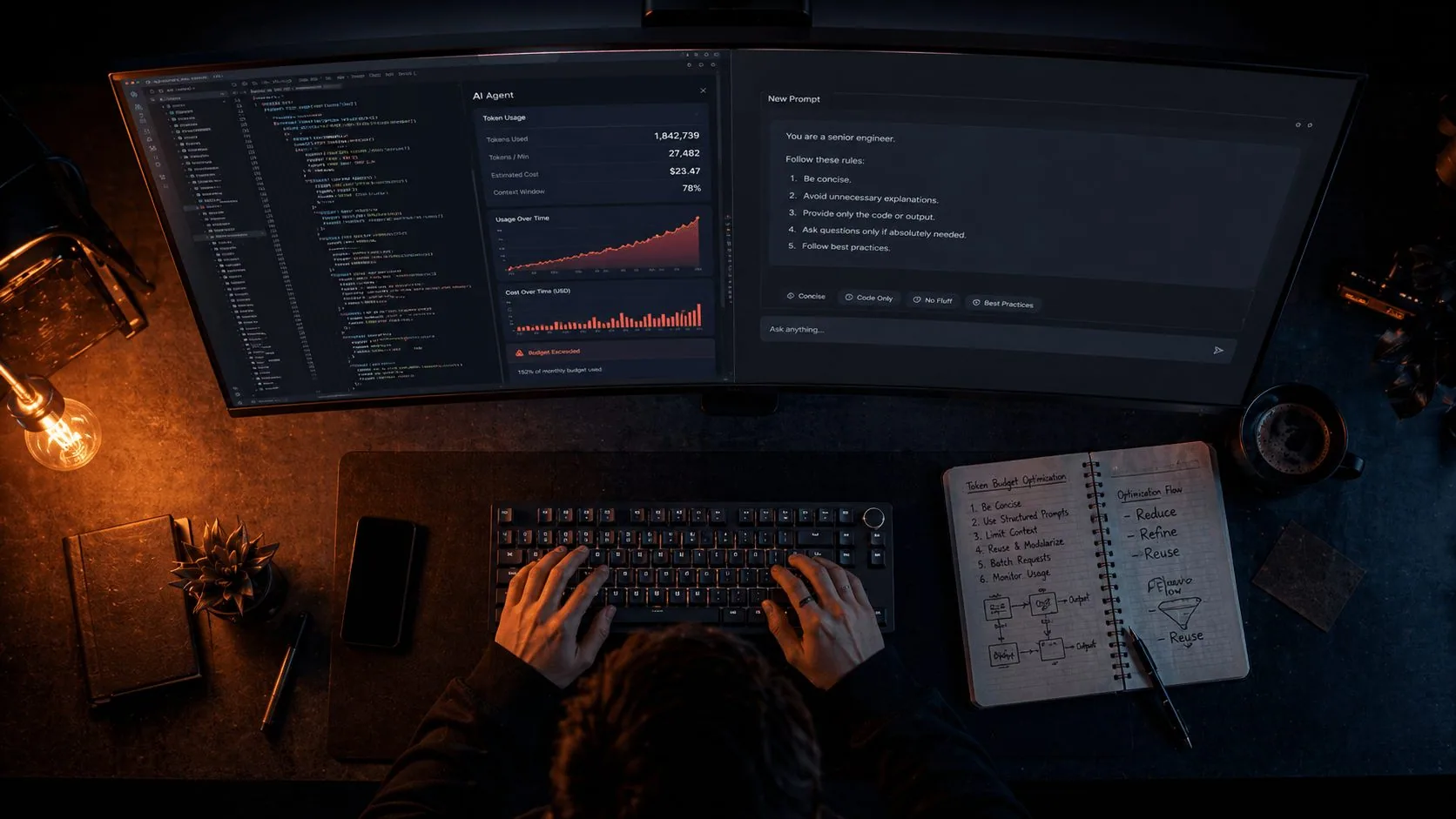
Something shifted in how developers talk about AI coding tools in 2026. A year ago the conversation was about what these tools could do. Now it's increasingly about what they cost — and specifically, why those costs feel so unpredictable.
A developer ran a single /typescript-checks command in Claude Code. It spawned 49 specialized subagents running in parallel for two and a half hours. Estimated cost: somewhere between $8,000 and $15,000 for a single session. A financial services team left 23 subagents running unattended analysing code overnight. Three days later: $47,000 in token costs.
These are extreme cases. But they point at a real dynamic that affects every developer using Cursor, Claude Code, or any other agentic AI tool at scale: token costs in multi-agent systems don't scale linearly — they compound. Each tool call adds context. Each sub-agent response feeds back into the orchestrator.
The good news is that this is a solvable problem. Token optimisation in 2026 is not about writing shorter prompts. It's about understanding the architecture of how these tools actually consume context — and then making deliberate choices at every layer.
This is the guide we wish existed when we started running these tools in production.
First: Understand How You're Actually Being Charged
The billing model for AI coding tools changed significantly through 2025 and into 2026, and if you're still operating on mental models from two years ago, you're probably confused about why your bills look the way they do.
Cursor no longer uses a simple request counter. It uses a credit pool system. The Pro plan costs $20/month and gives you $20 in credits. Every time you use a premium model, the cost is deducted based on the model's actual API rate. That means Claude Sonnet 4.6 costs meaningfully more per interaction than the Auto mode models — and Max Mode expands the context window from the default 200K tokens up to 1 million tokens depending on the model, but it consumes significantly more credits per request.
The critical thing to understand: every turn re-sends your entire conversation history. A fresh session sends around 20K tokens per turn. A 200-turn session sends around 200K per turn. Message 50 costs more than message 5 not because you asked something harder, but because Claude re-reads 49 prior messages first. Long sessions are geometric cost machines.
For Claude Code specifically: the average cost is around $13 per developer per active day and $150–250 per developer per month, with costs remaining below $30 per active day for 90% of users. That baseline is before optimisation. The techniques in this guide can cut that by 40–85% according to community benchmarks — which represents real money at team scale.
There are also hidden costs most people don't account for. Each connected MCP server loads tool definitions into every message, costing up to 18,000 tokens per turn. If you have three MCP servers connected, you could be paying 54,000 tokens per message just in server overhead — before you've asked a single question.
The Mode Hierarchy: Most People Use It Backwards
Every major agentic IDE gives you multiple interaction modes. Most developers use the most powerful, most expensive mode by default — and switch down only when something breaks or costs spike. The right approach is exactly the opposite.
In Cursor, the hierarchy is:
- Inline Edit (Cmd/Ctrl+K) — cheapest. Single file, single change, minimal context. Use this for 60% of your work.
- Ask / Chat mode (Cmd/Ctrl+L) — moderate cost. Conversational, reads context but doesn't act autonomously. Use for exploration and questions.
- Agent mode — expensive. Reads files, runs commands, iterates on errors. A single agent task can trigger 5–15 model calls internally. At around $0.04 per call, that adds up.
Choosing the right mode saves 50–75% tokens per session. That's not a minor efficiency gain — it's the difference between a $5 day and a $20 day just from mode selection.
The mental model that works: use the cheapest mode that can accomplish the task. Escalate to Agent mode only for genuine multi-file, multi-step tasks. Reserve Agent mode only for multi-file refactors. An Agent run can burn 20x more tokens than a single Inline Edit.
In Claude Code, the equivalent principle is extended thinking. Extended thinking is enabled by default because it significantly improves performance on complex planning and reasoning tasks. Thinking tokens are billed as output tokens, and the default budget can be tens of thousands of tokens per request depending on the model. For simpler tasks — code explanations, quick fixes, documentation — you can disable thinking or lower the budget significantly without losing meaningful quality.
Plan First. Always. Without Exception.
This is the single highest-ROI change you can make to your AI coding workflow, and it's the one most people skip because it feels like an extra step.
When you jump straight to "build this feature," the AI makes assumptions about architecture, file structure, naming conventions, and scope. Half the time those assumptions are wrong, and now you're spending three more exchanges correcting them — each one re-sending the full conversation context.
Both Cursor and Claude Code have dedicated Plan Mode. In Cursor, it's /plan. In Claude Code, it's Shift+Tab twice to toggle into Plan Mode. Use it before any implementation task.
A planning exchange costs a fraction of an implementation exchange. And it prevents the most expensive thing of all: building the wrong thing and having to redo it. One solid plan eliminates two or three failed agent runs that would each trigger multiple internal model calls.
The practical habit: never type "implement X" without first typing "plan the implementation of X." Review the plan, correct any wrong assumptions, then proceed. This costs roughly 10% of what a failed implementation and correction cycle costs.
Context Scoping: Stop Giving the Agent Your Entire Codebase
One of the fastest ways to inflate token costs is letting the AI tool index and read your entire codebase for every request. This feels safe — surely more context is better? — but in practice, irrelevant context actively hurts output quality while adding significant token cost.
In Cursor, the @ mention system is your precision scoping tool:
@Codebase— triggers a RAG pass across your entire indexed codebase. Use sparingly.@File— scopes context to a specific file. Use for single-file tasks.@Folder— scopes to a folder. Use for feature-area work.@Docs— pulls in specific documentation. Use instead of pasting documentation text.
The rule: use the most specific @ reference that gives the agent what it actually needs. If the task is fixing a bug in one component, @File the component. Don't @Codebase and hope the agent figures out what's relevant.
In Claude Code, the equivalent discipline is file reference specificity. When Claude Code reads files, their contents are added to the context. Only reference the minimum necessary files. For large files, specifying a line range is also effective.
Instead of: Check src/components/Auth/ and fix the validation issues
Use: Check src/components/Auth/LoginForm.tsx lines 45–90. There might be an issue with the email validation regex.
A single autocomplete can consume 3,000+ tokens when only 200 are needed. Precision scoping is the primary lever for bringing that number down.
You should also set up a .cursorignore or .claudeignore file that explicitly excludes directories the AI doesn't need: node_modules, dist, .git, coverage, *.log files, large generated files. These add significant context overhead when indexed without contributing anything useful to most requests.
CLAUDE.md and .cursor/rules: Your Persistent Context Architecture
If you're explaining your project stack, conventions, and patterns to the AI at the start of every session, you're paying to repeat yourself thousands of times. The right approach is to encode that context once in a persistent configuration file that loads automatically.
In Claude Code, this is CLAUDE.md at your project root. By documenting important information in CLAUDE.md at the project root, you avoid repeating explanations in every conversation. CLAUDE.md contents are preserved through /clear commands, so your project's basic configuration is maintained.
A well-structured CLAUDE.md looks like this:
The critical constraint: aim to keep CLAUDE.md under 200 lines by including only essentials. A 5,000-token CLAUDE.md costs 5,000 tokens before you've typed a word. Every turn. Every session. A constant baseline you carry at all times.
In Cursor, the equivalent is the .cursor/rules/ folder with modular rule files scoped by domain:
Use auto-attached rules with glob patterns instead of always-on rules to reduce the token tax. A testing rule that only loads when you're working in *.test.ts files doesn't waste tokens on non-test sessions. An API rule that only loads when you're in the src/api/ folder doesn't pollute your UI component work.
Thread and Session Management: Kill Long Conversations
This is the most counterintuitive optimisation because it feels like starting fresh means losing progress. In reality, a long conversation with accumulated context is often working against you on two dimensions: it's costing more per message, and it's producing worse output as early context loses relevance.
Threads that exceed 10–15 messages become "toxic" to your budget. Each new message resends the entire history. Start a fresh chat once a specific sub-task is done.
The practical workflow for complex tasks:
- Start a session, complete one logical sub-task
- Before starting the next sub-task, write a brief handoff note: "We decided to use optimistic locking for the user update flow, and we're avoiding schema changes in this sprint"
/clearin Claude Code or start a new chat in Cursor- Paste the handoff note into the fresh session
- Continue
You'll reconstruct useful context in a fraction of the tokens it would take to re-explain from scratch.
In Claude Code, use /compact when you want to compress rather than clear — it summarises the conversation history into a dense representation before the context window fills. Guide the compaction before running it: tell Claude what decisions or constraints are most important to preserve in the summary. This is better than letting autocompact fire automatically, which has less control over what gets prioritised in the summary.
Subagents: Powerful But Double-Edged
Subagents — spawning secondary AI instances to handle specific tasks — are one of the most powerful features in modern agentic IDEs. They're also one of the easiest ways to accidentally multiply your token costs.
The right mental model for subagents: use a subagent when the task would pollute your main conversation. If the task is small, do it inline. If the task is wide, isolate it.
Good uses of subagents:
- Running a full test suite analysis where you want the output isolated from your main session
- Large file reads where the content is exploratory and you only need a summary back
- Independent review of code written in the main thread
Bad uses of subagents:
- Small lookups that fit comfortably in the main thread
- Parallel fan-out without explicit limits defined upfront
Agent teams use approximately 7x more tokens than standard sessions when teammates run in plan mode, because each teammate maintains its own context window and runs as a separate Claude instance.
If you're building custom automation with Claude Code agent teams: set explicit parallelism caps in your CLAUDE.md or configuration. Never leave parallel subagent chains running unattended for extended periods. The compounding math on parallel agents with their own context windows can produce bill surprises that are genuinely shocking.
MCP Servers: Connect Only What You Need
MCP (Model Context Protocol) servers extend your AI agent's capabilities — connecting it to GitHub, Slack, databases, documentation, and other external systems. The capability expansion is real. The token cost is also real and easy to underestimate.
Each connected MCP server loads tool definitions into every message, costing up to 18,000 tokens per turn. Three MCP servers means up to 54,000 tokens of overhead baked into every single message — before any conversation content.
Cursor reported a 46.9% reduction in tokens when using its dynamic context engine with multiple MCP servers — which shows both how significant the overhead is and how much headroom exists for optimization.
The discipline: connect only the MCP servers you actively need for the current task. If you're doing frontend work that doesn't require database access, disconnect the database MCP server for that session. If you're not doing GitHub operations, disconnect the GitHub MCP server. Sometimes a CLI command is better. If gh pr view gives you exactly what you need, you may not need a GitHub MCP server for that action.
Model Routing: Match Model to Task
Not every task needs your most capable — and most expensive — model. Developing an intuition for model routing is one of the highest-leverage optimisation skills in 2026.
A practical routing framework:
Use your cheapest model (Auto/Flash/Haiku-tier) for:
- Boilerplate generation
- Simple refactors with clear instructions
- Code formatting and style fixes
- Converting between equivalent formats (CSS to Tailwind, etc.)
- Syntax questions with obvious answers
Use mid-tier models (Sonnet-class) for:
- Feature implementation with moderate complexity
- Bug debugging with clear reproduction steps
- Writing tests for existing functions
- API integrations with documentation available
Reserve your most capable model (Opus-class) for:
- Complex architectural decisions
- Debugging subtle, hard-to-reproduce issues
- Generating the initial structure for complex features
- Critical security or performance work where correctness is paramount
The single highest-impact optimization is routing. Most agent tasks don't need your most powerful and expensive model. Route simple tasks to cheap models and reserve expensive models for complex reasoning.
In Cursor, you can switch models mid-session without starting a new thread — which means you can use a cheaper model for exploratory questions and upgrade to a more capable model only when the task demands it.
Prompt Engineering: Stop Paying for Filler
Every word in your prompt consumes tokens. Every word in the AI's response consumes tokens. The quality of your output goes up and the cost goes down when prompts are precise and structured.
The most expensive prompt pattern is vague, conversational requests that require multiple clarifying exchanges. "Can you take a look at the auth module and help me think through the best approach for adding rate limiting?" costs tokens in the initial exchange AND in the two or three clarifying rounds that follow.
The efficient equivalent: "Add rate limiting to src/api/auth/login.ts. Use Redis for the counter. Limit: 5 attempts per 15 minutes per IP. Return 429 with Retry-After header."
For system prompts — the persistent instructions that load before every conversation — the principle is density over verbosity:
Instead of: "If the user asks for a summary, please make sure not to include an introductory paragraph or a concluding paragraph, and focus on the key points."
Use: [Summary: key points only; no intro; no conclusion]
Shorter prompts cost less. But beyond length, structured prompts also produce better first-attempt results, reducing retries. Retries are an invisible cost multiplier — every wrong generation that you have to ask the model to redo is paid for twice.
Also: a common token sink is re-requesting reformatted output. "Can you give me that as a bullet list?" If you need something reformatted, ask for it in the format you need the first time. Re-requesting means Claude regenerates content it already produced, doubling the token cost.
The Semantic Cache: Zero-Cost Repeat Queries
For teams building custom AI-powered tools and automation pipelines — rather than using off-the-shelf IDEs — semantic caching is the optimisation that produces the most dramatic cost reductions.
The concept: instead of sending every query to the LLM, maintain a vector database of previous queries and their responses. When a new query comes in, check whether a semantically similar query has been answered before. If the similarity score exceeds a threshold, serve the cached response — at zero token cost.
For repetitive workflows — documentation lookups, code review patterns, standard error diagnosis, common refactor requests — the cache hit rate can reach 40–60% within a few weeks of operation. That portion of your token budget drops to zero.
Anthropic's prompt caching gives a 90% discount on cached input tokens. If your agent has a long system prompt (common with tool-heavy agents), this alone can cut 20–30% of your bill. This is different from semantic caching — it's API-level caching of repeated prompt prefixes — and it requires no additional infrastructure to implement, just the cache_control parameter in your API calls.
The Optimisation Stack: Where to Start
If you're reading this and want to know where to begin, here's the priority order based on actual impact:
Immediate impact (do today):
- Set up
.cursorignore/.claudeignoreto exclude irrelevant directories - Create a lean CLAUDE.md or
.cursor/rules/folder — under 200 lines, only essentials - Switch to Inline Edit / Ask Mode for the majority of your daily work
- Start killing long threads — max 10–15 turns before a fresh start
High impact (this week):
- Enable Plan Mode before every implementation task
- Scope all
@references in Cursor to the minimum necessary context - Disconnect MCP servers you're not actively using
- Switch to cheaper models for routine tasks — upgrade only when needed
Compound impact (ongoing):
- Build session handoff notes into your workflow for complex multi-session tasks
- Implement prompt caching for any custom tooling
- Track costs weekly to identify which workflows are consuming disproportionate budget
| Technique | Tool | Estimated Token Saving |
| ------------------------------- | -------------------- | ------------------------ |
| Mode switching (Ask vs Agent) | Cursor | 50–75% per session |
| Plan Mode before implementation | All tools | 40–60% |
| Lean CLAUDE.md / rules files | Claude Code / Cursor | 30–50% |
| Thread refresh at 10–15 turns | All tools | 30–50% |
| Precision @ scoping | Cursor | 40–50% |
| MCP server discipline | Claude Code / Cursor | Up to 46% |
| Model routing by task type | All tools | 60–80% on routed tasks |
| Semantic caching (custom tools) | Custom agents | Up to 100% on cache hits |
The cumulative effect of applying these techniques consistently is significant. With the right optimization strategies, most teams can cut their AI agent costs by 60–80% without sacrificing quality.
Token optimisation is not about getting less from your AI tools. It's about understanding how they actually work — and then designing your workflow to get more from them for less.
Building AI-powered products or automation pipelines for your business?
At Joyboy, we design and build AI-integrated systems for UAE businesses — from agentic workflows to production LLM integrations — with cost architecture built in from the start. Talk to us about your project.