

More
Сhoose
Contact usTalk to our AI

Playdesk

All-in-one play area software for indoor playgrounds and soft play centres, with bilingual digital waivers, fast family check-in, live session timers, memberships, payments, and daily reporting.

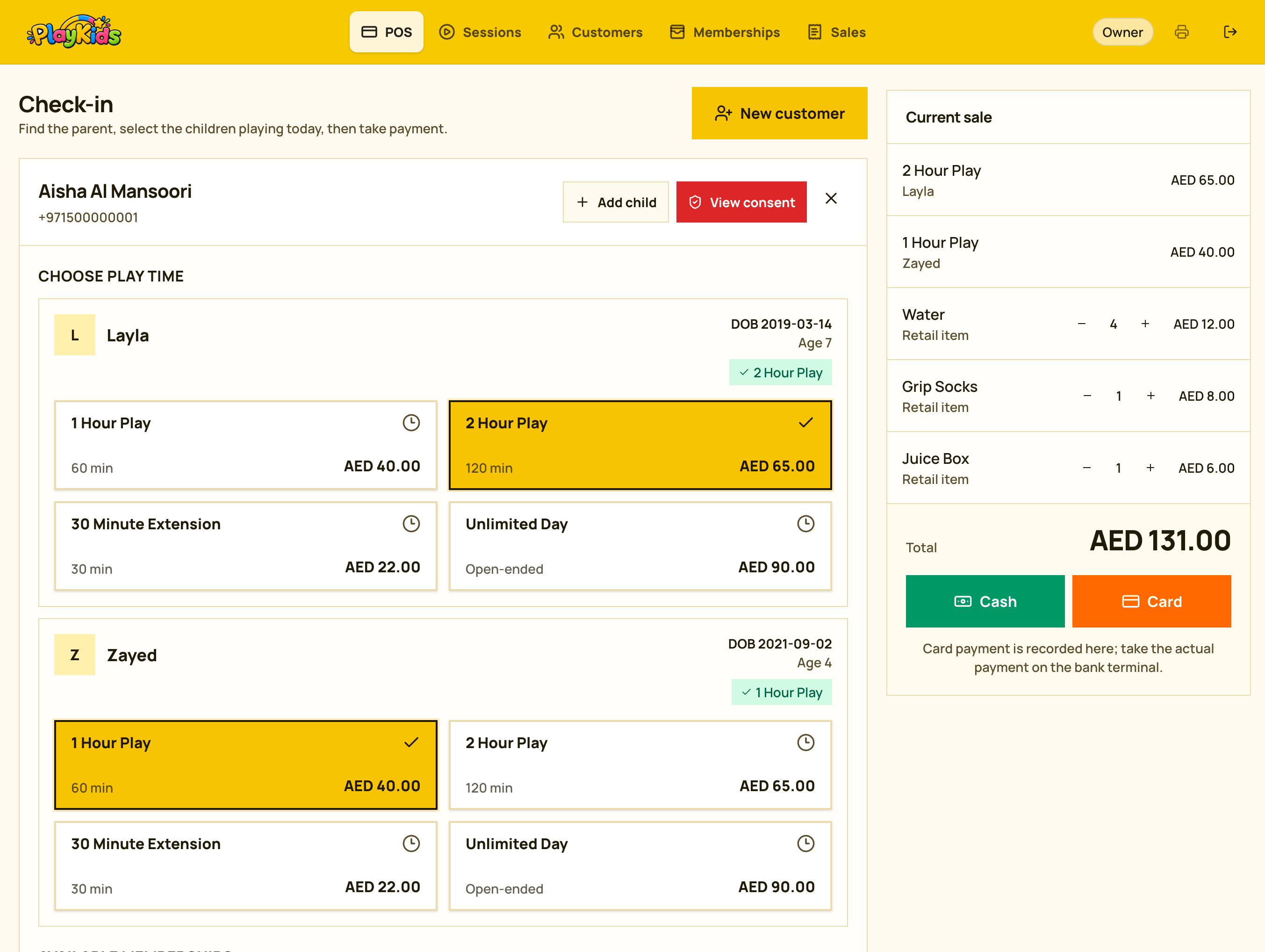
Playdesk POS check-in screen
Bilingual waiversLive play timersAED + VAT ready
Built for the rush

The Saturday afternoon test

Twelve families arrive in ten minutes. One parent is filling in a paper waiver on a clipboard. Another swears she signed one last month, and nobody can find it. There are three kitchen timers on the desk and your team cannot remember which one belongs to the boy in the red socks. Someone's 90 minutes ended twenty minutes ago. The queue is out the door and the till has not been opened yet.

That afternoon is where play areas lose money — in unbilled overtime, in families who walk out of the queue, and in the hour after closing spent trying to work out what the day actually took.

Playdesk is built for that afternoon.

Front-desk workflow

How Playdesk works at your front desk

01

The parent signs once, on screen

A first-time parent reads your waiver in English or Arabic and signs it with a finger. It is saved against their name along with exactly which children it covers. Next visit there is nothing to sign and nothing to file. If a waiver is close to expiring, your team sees it before the family reaches the desk.
02

Check the family in

Search a phone number and the whole family appears — parent, children, membership, and past visits. Tap the children playing today and pick the session length. Any allergy or safety note appears immediately. Adding a new family takes about a minute and saves them for future visits.

03

Take the payment

Add the session, grip socks, and refreshments to one bill, then record cash or card. Card payments still go through your existing bank terminal. If the family has a membership or visit pack, Playdesk deducts the visit automatically and shows the remaining balance.

04

Watch the room, not the timers

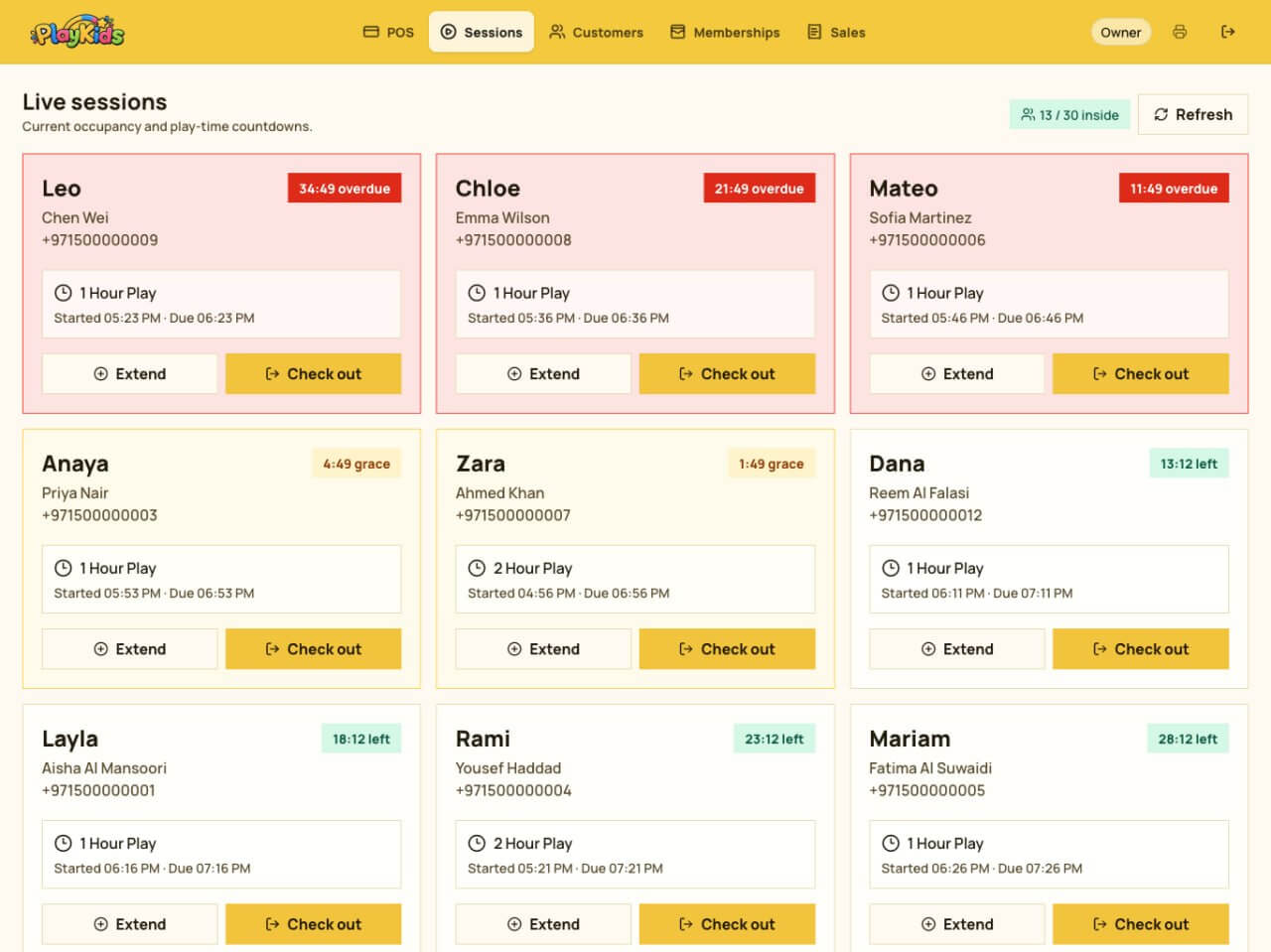
One screen shows every child inside and how long each has left. Sessions running low turn amber so staff can offer an extension before overtime becomes an argument. Checkout and extension are each one tap.

05

Close the day in two minutes

At closing, see the day's takings split by cash and card, sessions sold, memberships signed, and activity by hour. No counting slips and no spreadsheet.

UAE / GCC

Built for the busiest hour at an indoor playground front desk

Playdesk replaces paper waiver folders, kitchen timers, and disconnected till records with one clear operating screen. Staff can find a family, see each child and any allergy or safety note, start the right play session, collect payment, and monitor everyone currently inside. Owners get accurate AED sales, occupancy, membership, and branch reporting without rebuilding the day in a spreadsheet.

01
Indoor playgrounds and soft play centres
02
Kids play zones and family entertainment venues
03
Trampoline parks that sell timed admission sessions
04
Single or multi-branch operators across the UAE and GCC
The system

Everything the front desk needs

01
Digital waivers in English and Arabic with signature, consent, and expiry tracking
02
Family profiles with children, dates of birth, allergies, medical details, and safety notes
03
Timed check-in, live occupancy, countdowns, extensions, and one-tap checkout
04
Admissions, retail items, cash or card payments, and VAT-ready receipts
05
Memberships, visit packs, family plans, balances, and expiry dates
06
Staff permissions, audit history, sales analytics, and multi-branch reporting
Workflow
01
Sign the waiver
02
Check children in
03
Take payment
04
Track play time
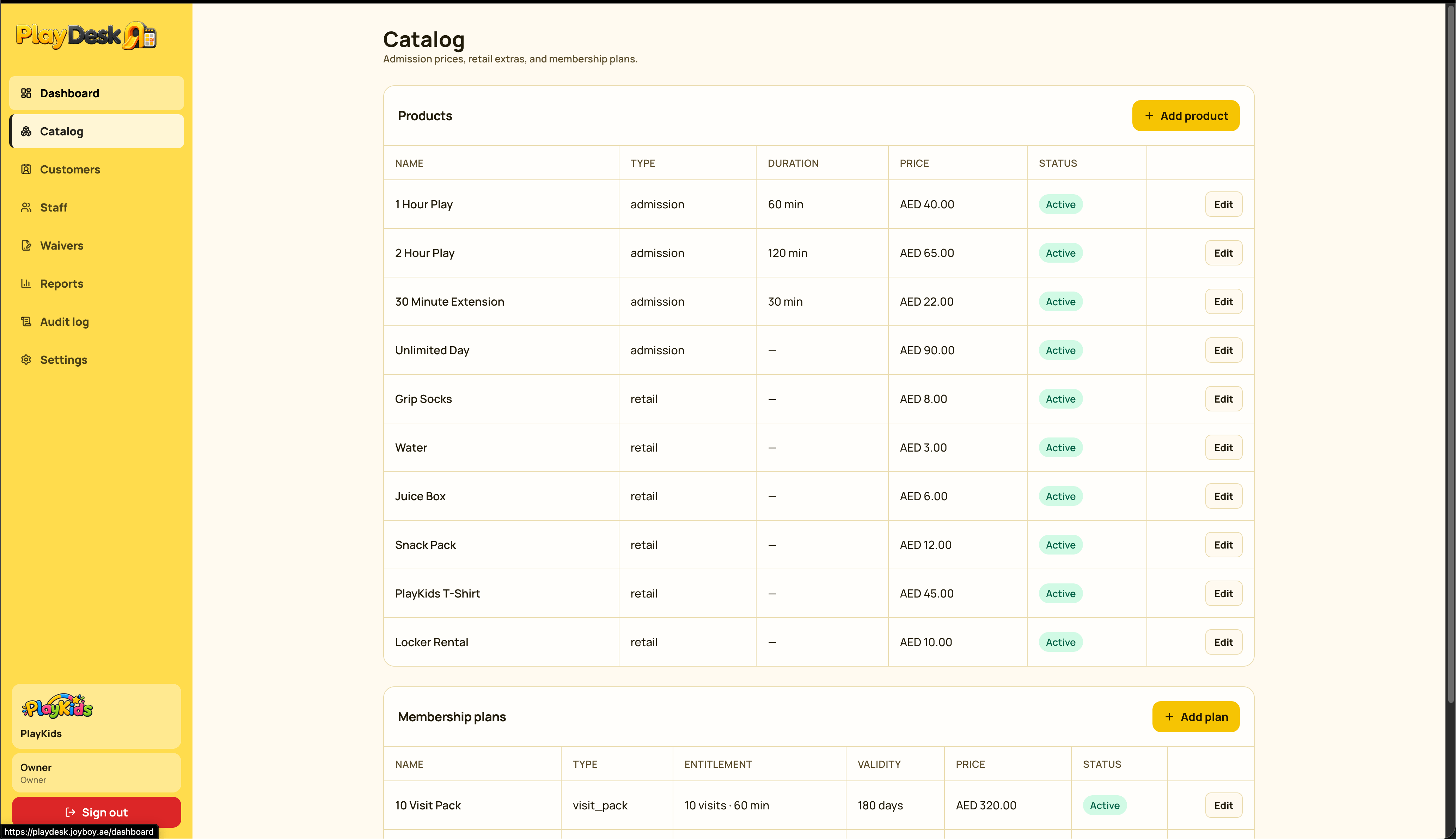
Product screens

Playdesk in use

Playdesk POS check-in screen on iPad
Playdesk live sessions screen on iPad
Playdesk interface preview 3
Playdesk interface preview 4
Product tour

Made for what actually happens at the counter

Every screen keeps the important decision visible: who is playing, how long they have left, whether consent is valid, what the family owes, and how the day is performing.

Know exactly who is inside

See every active child and countdown at a glance. Overdue sessions, grace periods, and remaining time are visually distinct, so staff can act before overtime becomes a problem.

  • Capacity visible at all times
  • Extend or check out from the same card
  • Guardian details stay attached to each session

Replace waiver folders with proof you can find

Parents read in English or Arabic, sign on screen, and choose photo and marketing permissions separately. Playdesk records the signer, children covered, document version, and expiry.

  • Bilingual document versions
  • Finger signature on any touch device
  • Existing signatures stay tied to their original wording

Turn happy visitors into regulars

Sell visit packs and unlimited plans to a child or the whole family. Staff see active memberships and remaining visits immediately, without checking a spreadsheet or asking a manager.

  • Family-wide or child-specific plans
  • Automatic visit balance tracking
  • Clear validity and expiry dates

See how the venue is doing without being there

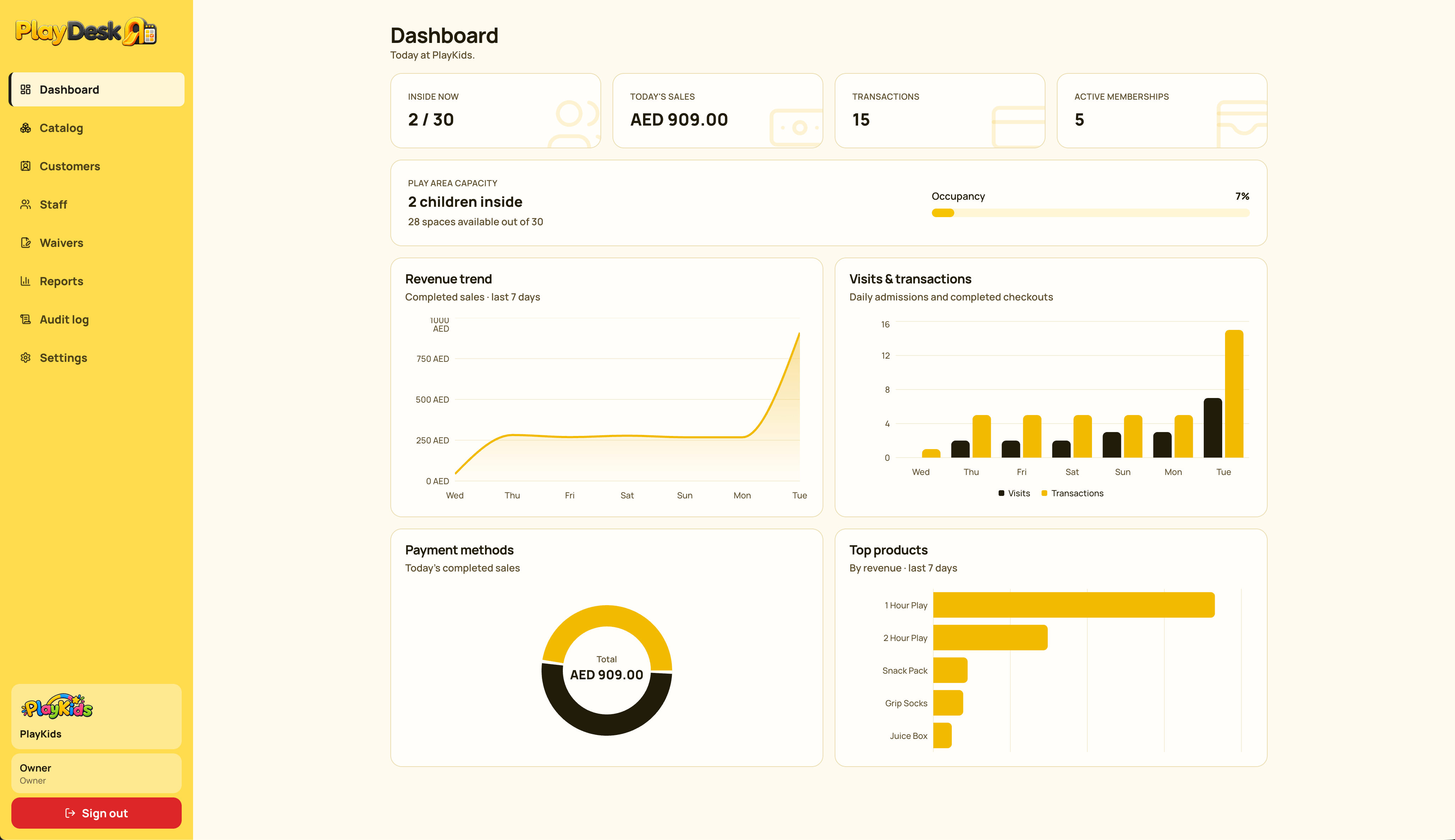
Open the dashboard from a laptop or phone to see today's occupancy, sales, transactions, and membership activity. Trends turn counter activity into decisions you can use.

  • Cash and card totals
  • Revenue and visit trends
  • Capacity and active memberships
Complete feature set

What you get

Digital waivers in English and Arabic

Signed on screen at the desk, stored against the parent, and findable in seconds if anyone ever asks.

  • Parents read and sign in the language they are comfortable in
  • Every signature records exactly which children it covers; adding a new child asks for a fresh signature
  • Photo consent and marketing consent are asked separately
  • You decide how long a waiver lasts to match your insurer's requirements
  • Expiry dates are tracked automatically and returning families are flagged before check-in
  • Waiver wording can be updated while old signatures stay tied to the exact version signed
  • Every signed waiver is searchable by parent name or phone

Allergies and safety notes, where staff will see them

The things a parent tells you once and expects every member of staff to remember.

  • Keep allergy, asthma, medical, accessibility, or authorized-collection notes against any child
  • The note appears when that child is checked in instead of remaining buried in a file
  • Each child's date of birth stays on record so equipment age limits are easy to enforce
  • Parent-level notes can record useful service or account context

Timed sessions you can actually see

  • Live view of every child currently inside
  • A countdown per child to prevent unbilled overtime
  • Configurable 60, 90, 120-minute, or custom session lengths
  • One-tap session extensions
  • Configurable venue capacity and grace periods
  • Different weekday, weekend, and holiday prices
  • Till buttons can be ordered around what staff sell most
  • Seasonal products can be disabled without losing sales history

Memberships and visit packs that bring families back

  • Sell visit packs, monthly memberships, or unlimited plans for one child or the family
  • Visits are deducted automatically at check-in and the remaining balance is visible
  • Every pass can have its own expiry date
  • A pass can include a different session length from a walk-in admission
  • Staff see membership status as soon as they find the family
  • Convert a one-off visitor into a regular at checkout

Payments and receipts

  • Sessions, socks, drinks, and snacks on one bill
  • Record cash or card while keeping your existing bank terminal
  • VAT-ready receipts with your TRN, printed or shown on screen
  • Add a custom receipt footer for policies, opening hours, or social details
  • Refunds and cancelled sales keep a record of who acted and why

Know your customers

  • Every family's visit history, spending, and membership in one place
  • Find customers by name or phone number
  • Merge duplicate family entries
  • Capture phone and email while keeping marketing consent separate
  • Export your customer list whenever you need it

Reports the owner actually reads

  • Daily takings split by cash and card
  • Session and product sales quantities
  • Revenue performance by product
  • Busiest hours and days for staffing decisions
  • Membership sales and usage
  • Flexible reporting date ranges
  • Venue capacity and occupancy trends
  • Today's performance from your phone

Staff you can trust the till with

  • Fast staff sign-in with a short code and PIN
  • Every sale, refund, and check-in is linked to the employee who handled it
  • Owners and managers see reports and settings while counter staff do not
  • A new starter can usually be trained in fifteen minutes

More than one branch

  • Each branch keeps its own prices, staff, memberships, and reports
  • One owner login across every branch
  • Staff only see their assigned branch
  • A new location can begin with your existing setup copied across

Works on what you already own

  • Runs on an iPad, Android tablet, laptop, or existing POS terminal
  • Nothing to install from an app store and no mandatory new hardware
  • Your venue logo appears on the customer-facing screen
  • A brief Wi-Fi interruption will not double-charge a family or lose a session
  • Add a receipt printer later or print from your current device
Outcomes

A calmer desk and a clearer business

Move returning families from arrival to play in seconds instead of rebuilding their details

Reduce queues, missed waiver renewals, and unbilled overtime during peak sessions

Put allergy and safety information in front of staff exactly when a child checks in

Close the day with reliable cash, card, product, membership, and occupancy figures

Plans

Pricing

Choose monthly billing or pay for the year up front. The amounts below match the current Stripe checkouts. All prices are in AED and exclude VAT.

Starter

One branch, quieter weekdays

AED 199 / month

AED 183.25/month billed yearly — AED 2,199 total

  • One branch and up to 2 front-desk devices
  • Up to 400 sessions a month
  • Digital waivers in English and Arabic
  • Timed check-in and live countdowns
  • Customer and child records with allergy and safety notes
  • Cash and card sales with VAT receipts
  • Daily takings report

Multi-Venue

Two branches or more

AED 999 / month for the first branch

AED 915.67/month billed yearly — AED 10,988 for the first branch; additional branches are AED 4,999/year

  • Unlimited devices at every branch
  • Everything in Growth, including a waiver kiosk at every branch
  • Separate prices, staff, and reports per branch
  • One owner view across all branches
  • A named onboarding contact
  • Priority support within 2 hours

Monthly and yearly, side by side

PlanPaid monthlyPaid yearly (per month)Yearly totalAnnual difference
StarterAED 199AED 183.25AED 2,199Save AED 189
GrowthAED 499AED 499.83AED 5,998Includes AED 499 add-on
Multi-Venue, first branchAED 999AED 915.67AED 10,988Save AED 1,000
Multi-Venue, each additional branchAED 499AED 416.58AED 4,999Save AED 989

All plans have a 12-month minimum term. Yearly plans are invoiced once, up front. Growth Annual is AED 5,499 plus the required AED 499 annual consent-form integration, for AED 5,998 due at checkout. Four quarterly instalments are available on Multi-Venue on request.

One busy Saturday of sessions that would otherwise have run over unbilled tends to cover a month of Starter.
Optional extras

Add-ons

Optional extras are priced per venue and can be added later if you would rather start simple.

Waiver add-ons

Add-onWhat it gives youMonthlyYearly
Consent-form integrationCollect, manage, and track parent or guardian consent forms digitally. The annual add-on is included in the Growth Annual checkout total.AED 49AED 499
Sign before you arriveSend a signing link by SMS or WhatsApp so families arrive with consent already completed.AED 89AED 854
Waiver expiry remindersAutomatic parent reminders plus a staff list of waivers due to expire.AED 29AED 278
Waiver wording reviewYour waiver added to the bilingual template and reviewed by a UAE-qualified legal partner.One-off, from AED 2,500

Everything else

Add-onWhat it gives youPrice
Extra deviceAnother till position beyond the devices included in your plan.AED 49/month or AED 470 yearly
Receipt printer setupWe set up and test a receipt printer with your tills.One-off, AED 450 per printer; printer not included
Bring your data acrossMigration of customers, children, memberships, and remaining visit balances from spreadsheets or another system.One-off, from AED 900
Training at your venueHalf a day with your counter team and supervisors at your venue using your setup.One-off, AED 950 per session

Fees we waive

Some one-off charges disappear depending on how you sign up.

FeeNormallyWaived when
Setup and onboardingAED 750 per branchAny yearly plan and every Multi-Venue contract
Bringing your data acrossFrom AED 900Multi-Venue paid yearly
Setting up an extra branchAED 750From your third branch onwards
Your first monthYour plan rateWhen switching from another play area system and showing the closing invoice
Self-service waiver kioskAED 49/monthFirst 3 months free on yearly Starter; included on Growth and Multi-Venue

Waived fees are agreed when you sign and written on your order form. They apply to that term and do not automatically carry into a renewal.

The small print, made clear

Contract terms, in plain English

How long you are committing for

  • Monthly: twelve months minimum, billed monthly. After that it continues month to month and either side can end it with 30 days' notice.
  • Yearly: twelve months, invoiced up front. It renews for another year unless either side gives 30 days' notice before renewal.
  • Multi-Venue: twelve months across the account. Branches added during the year finish on the same date and are charged only for the months used.

Trying it first

  • The current Stripe subscription links bill immediately and do not include an automatic trial. Contact us before checkout if a trial has been agreed for your venue.

Changing your mind

  • Upgrades happen immediately and the remaining days are charged at the difference.
  • Downgrades happen at the next renewal.
  • Move from monthly to yearly at any time and receive credit for what you already paid.
  • Move from yearly back to monthly at renewal.

Cancelling

  • Cancelling inside a minimum term does not refund the term already invoiced.
  • Cancel a yearly plan within the first 30 days for a full refund minus any completed one-off work.
  • Add-ons follow the billing cycle of their plan.

Your data is yours

  • Export customers, sales, and waiver records whenever you want.
  • After leaving, you have 30 days to export everything before deletion.
  • Signed waivers and consent records remain available for your retention period so you can prove what was signed later.

Billing

  • Prices are in AED and exclude VAT.
  • Pay by bank transfer, card, or Stripe. Invoices are due within 14 days.
  • Your price is fixed for the committed term. Renewal changes require at least 60 days' notice.
FAQ

Questions before building this solution

How long does it take to check a family in?

A returning family takes seconds: search their phone number, select the children playing, choose the session length, and take payment. A first visit takes a few minutes because of the waiver, then nothing needs signing again until it expires.

Can we record a child's allergy?

Yes. Add an allergy, asthma, medical, or authorized-collection note to a child and it appears in front of whoever checks that child in. The parent tells you once and every member of staff knows from then on.

Can parents sign in Arabic?

Yes. Every waiver can be provided in English and Arabic. The parent chooses the language, and Playdesk records which version they signed and which children it covers.

Do I have to change how I take card payments?

No. Keep using your bank's card terminal. Playdesk records whether a sale was cash or card so the day balances at closing; card details never enter Playdesk.

What if the internet drops mid-sale?

An interrupted sale does not become two sales when the connection returns, so a family is not charged twice.

How long until we are up and running?

Most single venues are live within a week, including prices, session lengths, waiver wording, staff accounts, and desk training. Counter staff usually learn the system in about fifteen minutes.

Is our waiver legally watertight?

Playdesk records who signed, which document version, which children it covers, when it was signed, and when it expires. Your legal or insurance adviser should approve the wording itself, or the waiver review add-on can arrange a UAE-qualified review.

Can I see how the day is going without being at the venue?

Yes. Open the owner dashboard on your phone to see today's takings, current occupancy, and how the week compares.

We have two branches. Do we need two accounts?

No. Each branch keeps its own prices, staff, memberships, and reports while you see everything from one owner login. Staff at one branch do not see another branch's customers or takings.

What happens to our existing paper waivers?

Keep them for your records. From launch day, everyone signs on screen, and each returning family is added to Playdesk on its first visit.

See your own setup

See it with your own prices in it

Twenty minutes with your session lengths, prices, and waiver loaded in — not a generic slideshow. If Playdesk is not right for your venue, we will tell you.

No card is required for the trial. Nothing to install.